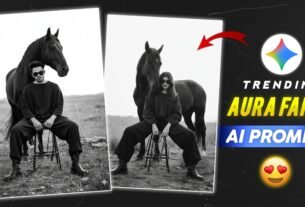
Toxic Movie Postar Ai Photo Editing Prompt 2026 – Friends, today I am going to tell you about a viral movie poster photo edit that you must have seen somewhere on social media. In today’s article, we will learn how to create this trending photo edit. I have previously shared information with you about various types of AI Photo Editing and also explained how to edit photos using ChatGPT. Today, once again, we are going to use ChatGPT to create a similar viral photo. Creating this photo edit is very easy, and you do not need any professional photo editing software for it. All you need is a good photo and the right Prompt, which I am going to provide in this article. So, without wasting any more time, let’s start creating this viral movie poster photo and learn how you can easily create it using your phone.
Details Of Toxic Movie Postar Ai Photo Editing Prompt 2026
This AI movie poster photo is trending massively on social media presently as you can see. A lot of people are altering their images with this movie poster and sharing it on social media. If you too want to make this trending AI photo edit then in this article I am going to tell you the quickest technique to create it. I will also share many types of AI Prompt which will make easy to produce this Photo edit for ladies and guys. I am going to explain the whole process of editing in a very basic and step by step way so that anyone can make it easily. You just have to read this text well and do all the procedures properly.
What Is Ai Toxic Photo Prompt?
The Toxic AI photo Editing Prompt may be quite useful for you to give your shot a dramatic and stunning effect. This challenge allows you to turn your standard photo into a cool movie poster type image. To generate such a picture you only have to send your best picture to ChatGPT and use the Prompt that comes with it. AI Will Turn Your Photo Into A Cinematic Movie Poster Or make your own shot using the Prompt given below and try this new AI shot Trend which is trending on social media.
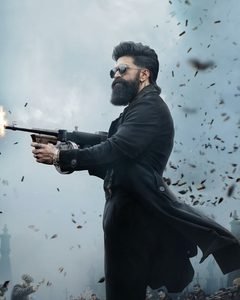
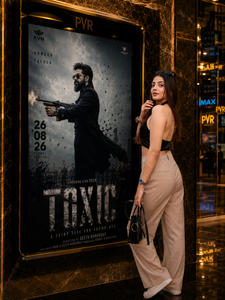
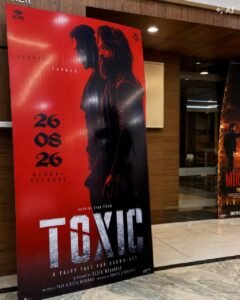
UNIVERSAL PROMPT (MALE/FEMALE) – CINEMA POSTER EDIT Use the provided cinema lobby image as the main reference and the uploaded personal photo as the replacement person. REPLACEMENT INSTRUCTION: Replace ONLY the person standing on the right side with the person from the uploaded photo. Do NOT change the poster, PVR frame, background, lighting, floor, reflections, or any other element. IDENTITY PRESERVATION (VERY IMPORTANT): Preserve the person's face, facial features, hairstyle, expression, and skin tone EXACTLY as in the uploaded photo. Do not beautify, reshape, smooth, or alter the face in any way. No face swap or Al face changes. The person must remain 100% recognizable. POSE & POSITION: Match the same natural standing pose as in the reference (hands in pockets, one leg slightly crossed). Adjust the body proportions naturally according to the person's gender (male/female) without changing identity. Maintain realistic posture, hands, fingers, and clothing fit. CLOTHING: Keep the exact same outfit from the uploaded photo. Match the lighting, shadows, and color grading to blend perfectly with the scene. POSTER & BACKGROUND – LOCKED: Keep the TOXIC movie poster inside the frame exactly the same (no changes to text, design, or colors). Do not move, crop, replace, or edit the poster or any background element. Maintain the golden marble wall, PVR logo, reflections, and overall cinematic environment. LIGHTING & REALISM: Match the warm golden lighting of the lobby scene. Ensure natural shadows, reflections, and depth. The final result should look like a realistic photograph, not an edited or artificial image. IMPORTANT: This prompt must work for both male and female subjects without changing their natural appearance.
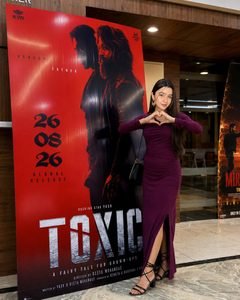
Ultra-realistic cinematic photo of a young South Asian woman posing confidently beside a large movie poster inside a luxurious modern cinema lobby. She is wearing a fitted deep-plum/magenta full-length ruched dress with a thigh-high slit, black strappy high heels, and carrying a small black shoulder bag. She is smiling naturally and making a heart shape with both hands in front of her chest. Long straight black hair, elegant makeup, realistic skin texture. Large dramatic red movie poster beside her, warm wooden wall panels, glass railings, marble flooring, modern ceiling lights, soft indoor illumination, realistic reflections and shadows. Natural candid photography, premium cinema atmosphere, DSLR quality, sharp subject, detailed face and clothing, cinematic color grading, shallow depth of field, photorealistic, 8K, vertical composition, 4:5. Preserve the person’s facial identity from the reference image exactly.
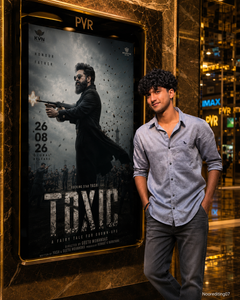
Use the uploaded cinema lobby image as the main reference and use the newly uploaded personal photo as the replacement person. Replace ONLY the person standing on the right side with the person from the uploaded photo. The result must work naturally for both male and female subjects. STRICT IDENTITY PRESERVATION Keep the uploaded person's identity exactly the same: Preserve the face, facial structure, eyes, nose, lips, jawline and skin tone. Preserve the original hairstyle, hair texture and facial features. Do not beautify, reshape, age, feminize or masculinize the face. Do not apply face-swap effects or artificial facial changes. The person must remain clearly recognizable as the person in the uploaded photo. POSE & BODY Naturally adapt the uploaded person to the same standing position beside the poster. Maintain realistic body proportions. Match the original perspective, scale and camera angle. Keep a natural relaxed pose with realistic hands and fingers. For a female subject, preserve her natural body shape and appearance without changing her identity. For a male subject, preserve his natural body structure and appearance. CLOTHING Keep the uploaded person's original clothing whenever possible. Naturally adjust the clothing to match the lighting, perspective and cinematic environment without changing its basic design. BACKGROUND & POSTER — LOCKED Do NOT change the cinema lobby, gold-and-black marble wall, PVR frame, lighting, reflections, floor, background or camera composition. Keep the TOXIC movie poster inside the frame exactly as the reference: Same poster artwork Same character Same red/black or cinematic color treatment Same title “TOXIC” Same release date and credits Same typography and layout Same poster proportions Do not replace, redesign or distort the poster. LIGHTING & REALISM
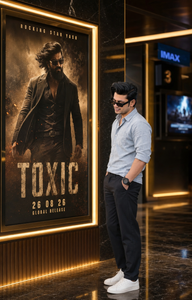
Create an ultra-realistic cinematic photo of the SAME person from the uploaded reference, preserving exact facial identity, hairstyle, skin tone, beard, age, and body proportions. Place him in a luxurious modern cinema lobby at night, standing on the RIGHT beside a large illuminated black-and-gold movie poster on the LEFT. He wears a light grey-blue rolled-sleeve shirt, dark trousers, white sneakers, and a watch, with one hand in his pocket and a natural smile. The poster prominently features Yash as a rugged action hero in dark clothing and sunglasses, with dramatic smoke, sparks, dust, and cinematic lighting. No guns, weapons, blood, injuries, or graphic violence. Add the title “TOXIC”, “ROCKING STAR YASH,” “26 08 26”, and “GLOBAL RELEASE.” Luxury black marble, golden trims, glossy floors, warm lighting, subtle blue cinema signage, DSLR photography, realistic skin texture, shallow depth of field, 4:5 vertical composition, authentic cinematic look.
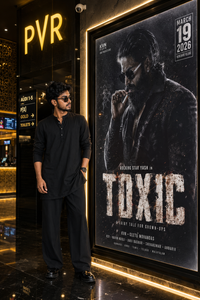
Create an ultra-realistic cinematic photograph inside a luxurious modern PVR cinema lobby in India. A young South Asian person stands beside a large illuminated movie poster display, looking toward the poster with a relaxed, confident pose. The person is dressed entirely in black: a loose black long-sleeve kurta-style top, wide-leg black trousers, and polished black shoes. They are wearing dark rectangular sunglasses and a black wristwatch. Medium-length wavy black hair, natural facial features, realistic skin texture, and a calm expression. One arm is relaxed near the waist while the other hangs naturally by the side. Beside them is a huge vertically framed movie poster featuring a rugged, bearded male action hero wearing sunglasses and a dark outfit, holding a cigarette. The poster has a gritty black-and-gray cinematic aesthetic with dramatic lighting and large distressed title typography reading “TOXIC”. Include realistic poster details such as “ROCKING STAR YASH IN”, “A FAIRY TALE FOR GROWN-UPS”, and the production credits at the bottom. A visible “MARCH 19 2026” release-date graphic appears in the upper-right corner. The cinema environment should have glossy dark walls, black-and-gold architectural details, warm golden accent lighting, reflective marble flooring, illuminated poster borders, and a clearly visible glowing “PVR” sign above the display. Include realistic cinema wayfinding signage in the background, subtle ceiling lights, security camera, ticketing/display screens, and deep shadows. Composition: vertical full-body portrait, person positioned on the left third and the large movie poster dominating the right side. Eye-level camera, natural perspective, realistic proportions, cinematic depth of field, subtle reflections on the polished floor, warm ambient lighting mixed with cool poster illumination. Photorealistic, ultra-detailed, realistic skin and hair, authentic fabric texture, natural body proportions, professional cinema photography, HDR, cinematic color grading, sharp subject, realistic shadows and reflections, 8K detail, no artificial-looking CGI, no distorted anatomy, no extra fingers, no duplicated objects. Seize 4:5
How To Generate Toxic Movie Postar Ai Photo Editing Prompt
Now let’s see how we can produce this easy viral Toxic Poster Photo. Its a really simple process and you don’t have to do any complex editing. 1. Choose any Prompt you choose from the side section. Go to chatgpt and upload your picture and add the prompt you copied. Then ChatGPT modifies your photo as per the Prompt and generates the final image. Don’t worry if you don’t know how to edit photos using AI in chatgpt. Below I have described the full process in a step by step manner easily. Here are the basic methods to create your photo.
- First, if ChatGPT is not installed on your phone, install it on your device. Alternatively, you can click the Create Your Image button provided on this site to directly open the ChatGPT website.
- Once it is open, click the Plus (+) icon and select the photo from your gallery that you want to edit.
- After that, you will find different styles of Prompts in this post. You can copy the Prompt that you like the most.
- Now, paste the Prompt below your uploaded photo and click the Send icon. Your photo will then be edited according to the Prompt. Once the editing is complete, click on the photo and save it to your device.
Conclusion
Thanks for trying out this viral Toxic Prompt! If you found this Prompt helpful, please sure to let me know in the comments so I can keep bringing you more trending AI Editing Prompts If you have any trouble altering your photo then follow all the instructions listed above carefully. This will allow you to effortlessly tweak your photo and publish it to social media to enjoy the trending style with your friends. Once you have modified your photo, share it with your friends so they can also utilise this viral Toxic AI Photo Editing Prompt to create their own photographs.